
Types of Vulnerabilities to Manage on Your PC

According to information released by the U.S. Cybersecurity and Infrastructure Security Agency (CISA) in 2021, hacking attacks increased by 33% compared to 2020, with a particular increase in attacks using Remote Desktop Protocol (RDP). Gartner also published data showing that 80% of successful IT system attacks are carried out by exploiting well-known vulnerabilities.
There are various PC vulnerabilities used for hacking, but the vulnerabilities most often used by hackers include:
1. Weak Passwords
2. OS and Program Vulnerabilities
3. Internet Explorer Vulnerabilities
4. SQL Vulnerabilities
Why is PC Vulnerability Management Necessary?
1. ‘PC Vulnerability Management’ is necessary to prevent business disruption or damage to the corporate image.
The WannaCry ransomware attack is a prime example. The WannaCry ransomware attack infected PCs in many companies around the world by exploiting the EternalBlue vulnerability present in Microsoft Windows.
Although Microsoft Windows had already officially released a security update, many companies did not apply it, making such an attack possible. This terrifying WannaCry ransomware encrypted files on infected computers and demanded money, causing data breaches and losses, leading to business disruption.
This attack highlighted the importance of PC vulnerability management.
2. ‘PC Vulnerability Management’ is an activity that can maximize the return on investment for corporate information protection.
In the United States, small and medium-sized businesses allocate an average of 5% of their total budget to information security, with about 15% of information security management costs being used for vulnerability management and security updates.
On the other hand, the damage caused by information leakage to companies can result in losses ranging from tens to hundreds of times their sales.
(2019 State of Cybersecurity in Small and Medium Size Business – U.S. Department of State, 2018 Worldwide Semiannual Security Spending Guide – IDC)
PC Vulnerability Check Item-Specific Measures
EXO Security provides a “PC Vulnerability Check” function that can manage PC vulnerabilities. It supports both Windows and macOS, and as of June 2023, it consists of 9 and 7 check items, respectively.
It is also possible to set check items for each security policy group, and customize settings according to internal security policies by (de)activating the “PC Vulnerability Check” function itself or by check item.
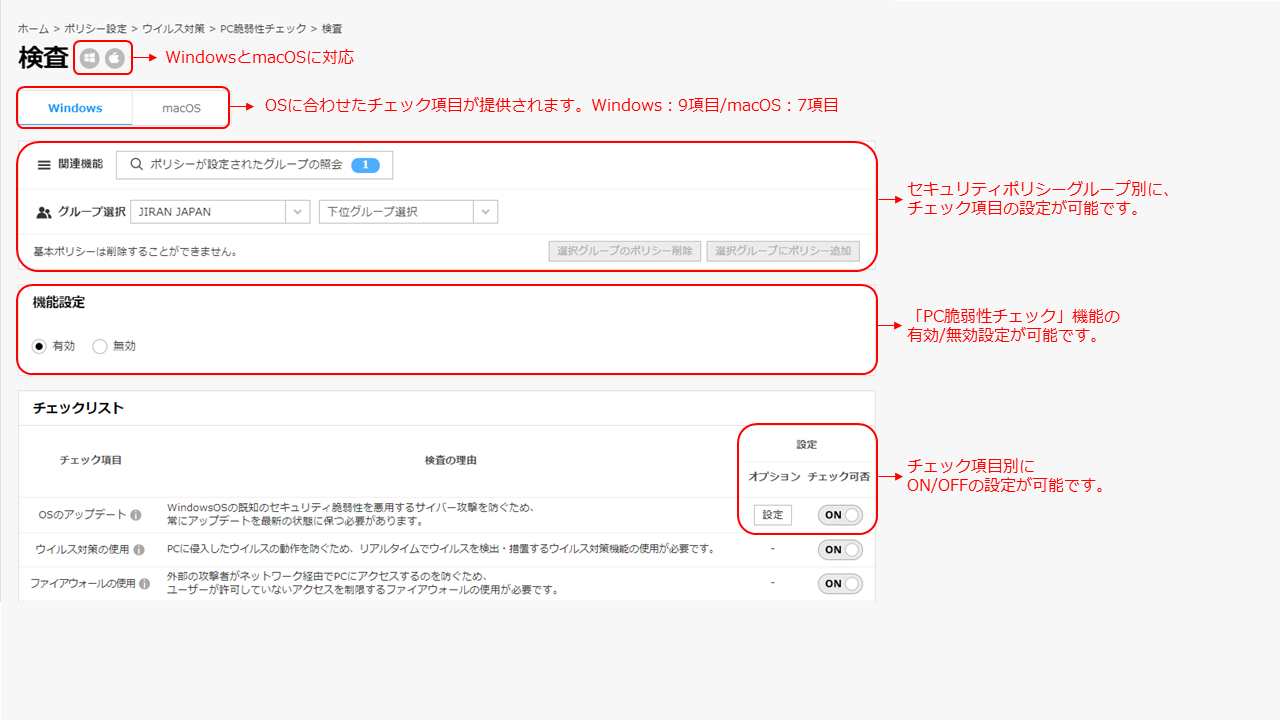
The important part here is the check items, and EXO Security’s check items are selected based on the check items recommended by national institutions and ISMS, etc.
Therefore, simply by introducing EXO Security services and using the “PC Vulnerability Check” function, you can say that you are meeting the security standards recommended by national institutions and ISMS.
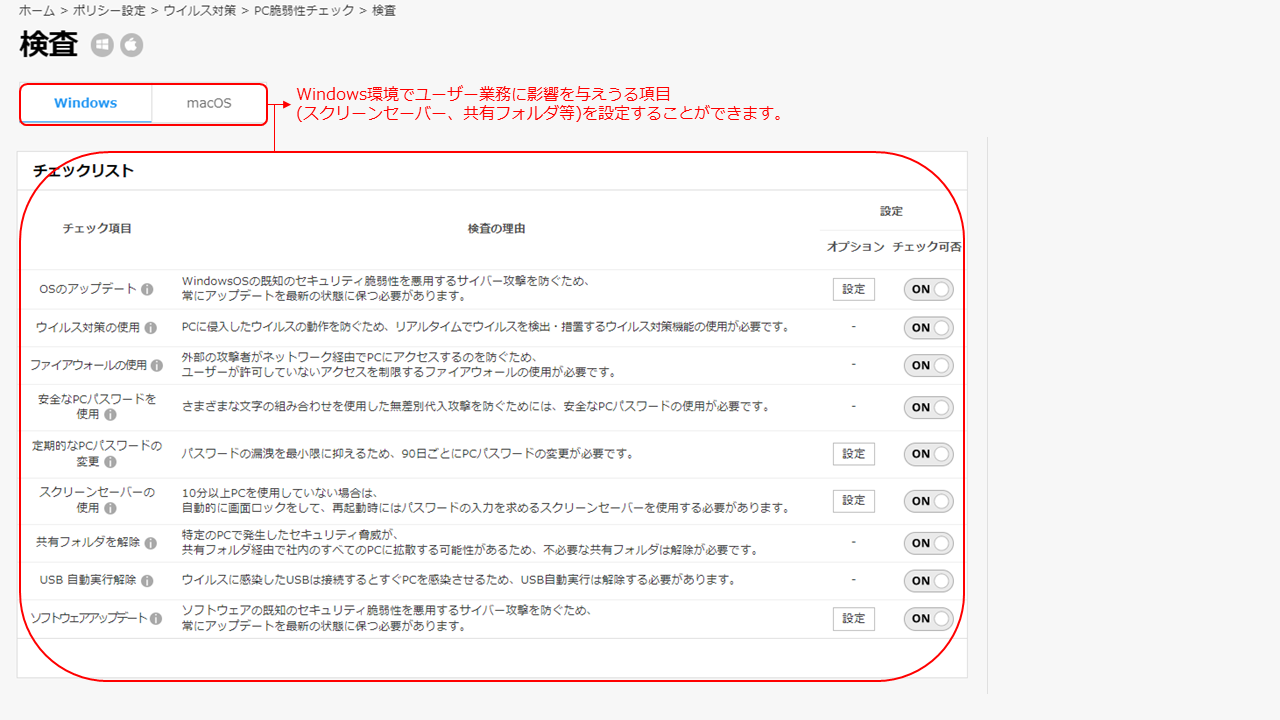
Problems that Occur When PC Vulnerabilities Are Not Managed
You should now understand that EXO Security’s “PC Vulnerability Check” function enables simple “PC Vulnerability Management” that meets security standards. Let’s take a look at the problems that can occur if the “PC Vulnerability Check” function is not properly managed for each check item.
| OS | Check Item | Potential Problems |
|---|---|---|
| Windows | OS Update | Exposure to cyber attacks that exploit known security vulnerabilities in Windows OS |
| — | — | — |
| Use of Antivirus | PC is infected with a virus | |
| Use of Firewall | External attackers access PC via network | |
| Use Secure PC Password | Password leaked due to indiscriminate substitution attack from outside | |
| Regular PC Password Change | Increased likelihood of password leakage to outside | |
| Use of Screen Saver | Disclosure of information on the screen and use of PC by third parties when PC owner is absent | |
| Release Shared Folder | Security threats occurring on a specific PC spread to all PCs in the company through the shared folder | |
| Disable USB Auto-Run | When a USB infected with a virus is connected, the PC is infected | |
| Software Update | Exposure to cyber attacks that exploit software security vulnerabilities | |
| macOS | OS Update | Exposure to cyber attacks that exploit known security vulnerabilities in macOS |
| — | — | — |
| Use of System Integrity Protection (SIP) | System files for PC to operate are altered | |
| Block Execution of Apple Unverified Apps | Exposure to cyber attacks that exploit security vulnerabilities in Apple unverified and unconfirmed developer apps | |
| Use of Firewall | External attackers access PC via network | |
| Use Secure PC Password | Password leaked due to indiscriminate substitution attack from outside | |
| Regular PC Password Change | Increased likelihood of password leakage to outside | |
| Use of Screen Saver | Disclosure of information on the screen and use of PC by third parties when PC owner is absent |
So far, we have looked at the necessity of “PC Vulnerability Management” and the EXO Security “PC Vulnerability Check” function.
For unwavering security management in companies, steady management is most important.
Why not start simple security management at an expert level with EXO Security’s “PC Vulnerability Check” function, which enables management that meets security standards?
For inquiries, please contact us here:
■ Email inquiries: globalsupport@jiran.com
